Mailchimp review: the smaller free plan, what you pay for, and when to upgrade
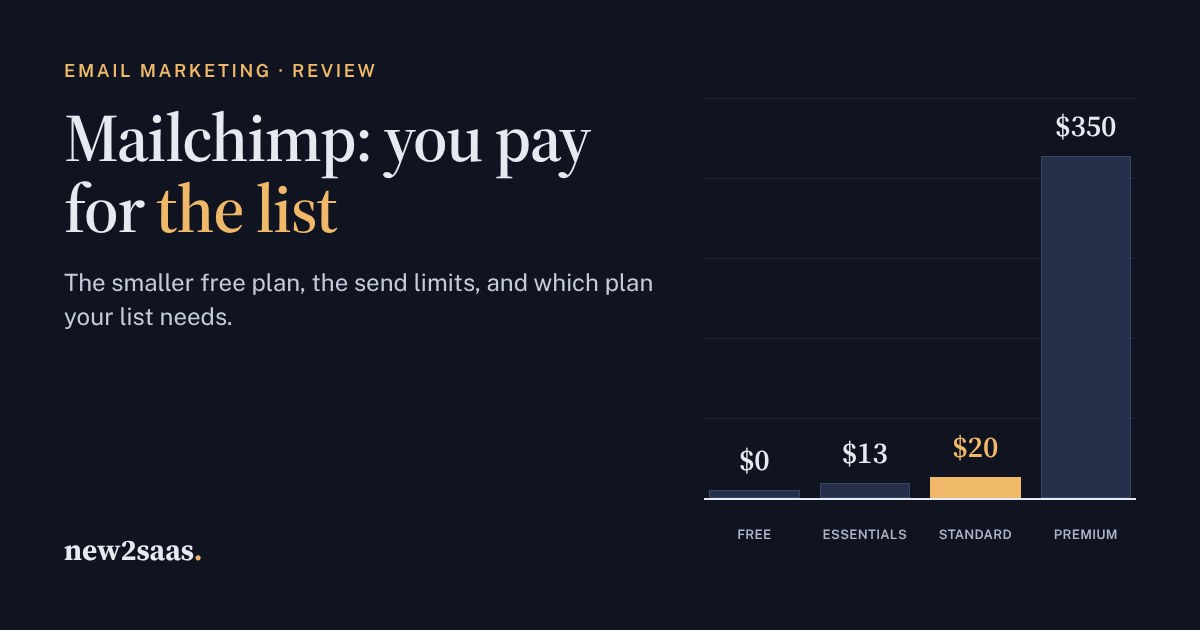
Mailchimp is still the best-known newsletter tool, but its free plan shrank in 2026 to 250 contacts and 500 emails a month, with no automations. Paid plans are priced by how many contacts you store: from $13 a month for Essentials and $20 for Standard at 500 contacts, and from $350 for Premium.
This review explains each plan's send limits, seats and automation limits, and what moving up a contact band costs. The calculator shows which plan your list and sending schedule need.
What Mailchimp is
Mailchimp is email marketing software: a contact list (Mailchimp calls it an audience), a drag-and-drop email editor, signup forms and landing pages, automated email sequences called flows, and reports on who opened and clicked. It has been the default newsletter tool for small businesses for years, and Intuit has owned it since 2021.
The main thing to understand about Mailchimp's pricing: you pay for the contacts you store, not the emails you send. Each plan lets you send a fixed multiple of your contact limit each month. Prices below come from Mailchimp's pricing page in November 2026, in US dollars.
The free plan: 250 contacts
Mailchimp cut its free plan in early 2026. It now covers:
- Up to 250 contacts, in one audience, with one user.
- 500 emails a month, and at most 250 a day.
- No automation flows, no A/B testing and no email scheduling, and Mailchimp's branding stays in your emails.
That is enough for a first test or a very small club newsletter. A business with a growing list will outgrow it within months.
Essentials, Standard and Premium
All three paid plans start at a price for the smallest contact band and rise as your list grows:
- Essentials, from $13 a month (500 contacts). Sends up to 10 times your contact limit each month, 3 users, 3 audiences, short automations (up to 4 steps) and 24/7 email and chat support.
- Standard, from $20 a month (500 contacts). Sends 12 times your contact limit, 5 users, 5 audiences, up to 200 automation flows, generative AI tools, dynamic content, custom reports and branded templates. This is the plan Mailchimp recommends for most businesses.
- Premium, from $350 a month (from 10,000 contacts). Sends 15 times your contact limit, unlimited users and audiences, multivariate and A/B testing, predictive segmentation and phone support.
Essentials and Standard have a 14-day free trial. The price rises each time your list moves into the next contact band. At 5,000 contacts, independent price trackers list about $75 a month for Essentials and $100 for Standard. Mailchimp's own pricing page has a slider for your exact number, and adds overage charges if you go over your contact or send limit.
Clean your list before you upgrade. Unsubscribed and long-inactive contacts still count toward the band you pay for.
Which plan your list needs
Strengths and weak spots
What Mailchimp does well
- It is easy to use. The editor, templates and forms are hard to get wrong.
- It connects to almost everything: shops, CRMs, form builders and website builders.
- Standard's automations are strong: up to 200 flows, with welcome series, abandoned-cart emails and re-engagement.
- Reporting is clear for people who aren't marketers.
What to watch
- The free plan is small now: 250 contacts and no automations.
- The price follows your list size. A large list of inactive contacts costs real money every month.
- A/B testing is listed only on Premium, which starts at $350 a month.
- Prices have risen repeatedly since the Intuit acquisition, according to independent trackers, so budget for increases.
Who Mailchimp is for
Mailchimp suits small businesses and organisations that send a regular newsletter and a few automated emails, want an easy editor, and have lists in the hundreds or low thousands. For large lists, compare tools that charge by emails sent rather than contacts stored; Brevo is the best-known. For a creator newsletter, price MailerLite and Kit (formerly ConvertKit) at the same list size.
What to look for
- Price your list a year from now, not today. The contact band you will be in matters more than the starting price.
- Check send limits if you email more than weekly.
- Count who needs a login. Essentials includes 3 users, Standard 5.
- Remove unsubscribed and inactive contacts regularly, because you pay for them.